The Capable Hub provides AWS backed CI for public repositories relating to CHERI. This page provides information on setup and use.
Installing The Capable Hub’s GitHub App
For repositories hosted outside of The Capable Hub’s GitHub organisation, it is necessary to install our GitHub App.
The Capable Hub’s GitHub App is used to monitor for workflow jobs and to create just-in-time ephemeral AWS-backed GitHub Actions runners to service workflow jobs. The application can be installed on personal or organisation accounts.
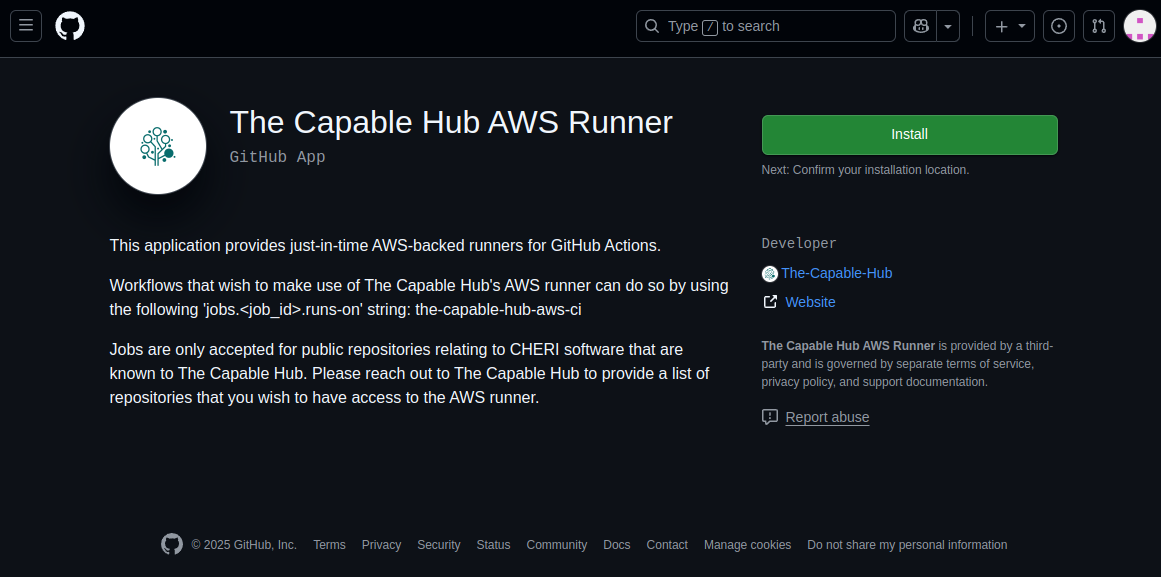
The application can be installed by navigating to the app’s GitHub Page and then clicking on Install. If your GitHub account is associated with one or more organisations, it will prompt you to specify which account it should be installed on. Please select the account that hosts the repositories that you wish to use our CI for.
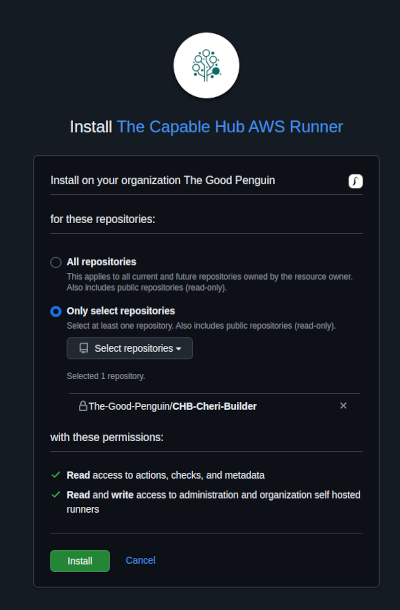
GitHub will then inform you of the permissions the app requires and prompt you to indicate which repositories you wish for it to have access to. We recommend limiting permissions to the repositories you wish to use our CI with. Once configured, please click Install.
Once the application has installed, you’ll be taken to the configuration page and see a banner that informs you that the app was installed. You can reach this page in the future by clicking on the ‘GitHub Apps’ link in the ‘Third-party Access’ section of your GitHub account’s setting page.

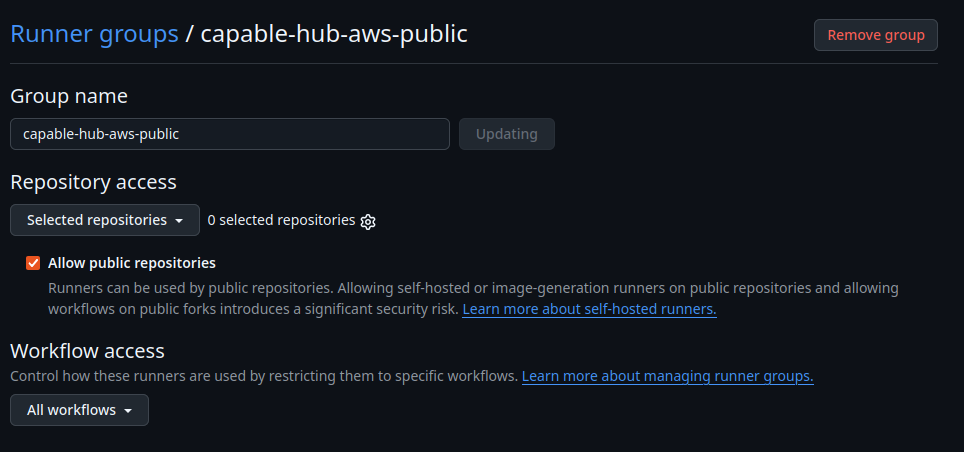
Lastly, you need to create a runner group for all of the ephemeral AWS runners. To do this navigate to actions, runner groups, click ‘New runner group’, call it ‘capable-hub-aws-public’ and then tick the box ‘Allow public repositories’. You can either allow the runner group to operate on all repositories within your organization (not recommended) or configure and filter the enabled repos (click the gear icon).
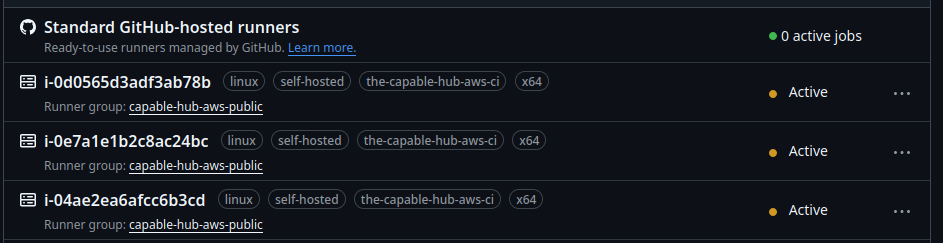
Please note that our runners are provided ‘just-in-time’, they will not be visible in the ‘Actions | Runners’ page of your GitHub account unless a job is actively being run. When they do run one should see the following:
While our CI compute is provided at no-cost to project owners, hosting repositories in your own organization may trigger GitHub’s own billing for Actions storage and self-hosted runner orchestration minutes (though these charges don’t generally apply to public repositories).
For more information on installing GitHub App’s, please see GitHub’s documentation.
Making use of The Capable Hub’s AWS backed Runners
Once the application has been installed, you can use our CI by simply using the runs-on parameter of ’the-capable-hub-aws-ci’ in a GitHub Actions workflow file. The following workflow file, which triggers on pushes to a branch named ‘main’, provides a skeleton example:
name: Skeleton

on:
  push:
    branches:
      - main

jobs:
  DoSomething:
    runs-on: the-capable-hub-aws-ci
    steps:
      - name: HelloWorld
        run: |
          echo "HELLO WORLD"
You can verify that a job was run on The Capable Hub’s runners by looking out for the text ‘The Capable Hub’ in the output of the ‘Set up job’ section in the Actions output.
Please note that jobs are only accepted for public repositories relating to CHERI software and are known to The Capable Hub - thus please provide a list of repositories that you wish to use our runners with to support@thecapablehub.org, so that we can whitelist them. You will also need to update the repo in the ‘capable-hub-aws-public’ runner group and in the ‘GitHub Apps’ section as well for every new repo.
For more information on creating and using GitHub Actions, please see GitHub’s documentation.
Runner Specification
At present the runners are at least 16 vCPUs with 32 GiB of RAM and 512 GiB of storage.
The CI runner host architecture can be specified by appending -amd64 or -arm64 to the runs-on: option. For example:
DoSomethingARM64:
    runs-on: the-capable-hub-aws-ci-arm64
    steps:
      - name: Check arch
        run: |
          uname -a
Will return something like:
Linux ip-10-0-101-176.eu-west-2.compute.internal 6.12.58-82.121.amzn2023.aarch64 #1 SMP Thu Nov 27 09:07:03 UTC 2025 aarch64 aarch64 aarch64 GNU/Linux
If no host architecture is specified the runner will default to amd64.
Uninstalling The Capable Hub’s GitHub App
The Capable Hub’s GitHub App can be uninstalled by clicking on ‘Uninstall’ in the ‘Danger zone’ of the ‘GitHub Apps’ page, found in the settings of your GitHub account. For more information on reviewing, modifying and uninstalling GitHub Apps, please see GitHub’s documentation.
Further Support
Please reach out to support@thecapablehub.org for further support and assistance.