Getting Started with CHERI-Zephyr: Setup, Build, and Run
- William Beasley
- Getting started guides
- December 11, 2025
The University of Birmingham recently received funding to continue developing CHERI support in the Zephyr RTOS. This is part of a wider £21 million investment from UKRI to back the development of CHERI-enabled hardware and the surrounding software ecosystem.
In this post, we will cover the current status for both the original and proposed open RISCV64 CHERI specifications, detail the necessary tools to use them (LLVM, QEMU, GDB), and walk through setting up a containerised development environment.
Current support
CHERI-Zephyr is currently under active development. With the latest release, you can build and execute several example applications within an emulated CHERI RISC-V QEMU environment.
Specific versions of QEMU, LLVM and GDB are currently required depending on which of the CHERI specifications you wish to use:
| Specification | Tool Versions | Supported Board Targets |
|---|---|---|
| CHERI-RISCV64 ISAv9 Original research architecture | Built using cheribuild.py - QEMU (latest based on upstream v7.0.0) - LLVM (latest based on upstream v17.0.0) - GDB (latest based on upstream v14.1) | qemu_riscv64cheri qemu_riscv64cheri_smp qemu_riscv64cheri_purecap qemu_riscv64cheri_smp_purecap |
| CHERI-RISCV64 ZCHERIPURECAP v0.9.5 RISC-V RVY architecture | - QEMU (2a2e882b based on upstream v6.2.0) - LLVM (1ca584e7 based on upstream v17.0.0) - GDB (df929d4d based on upstream v14.1) | qemu_riscv64cheri qemu_riscv64cheri_smp qemu_riscv64cheri_zcheripurecap qemu_riscv64cheri_smp_zcheripurecap |
The CHERI-RISCV64 ISAv9 specification is the formally proven, original research architecture for CHERI as developed by University of Cambridge. The CHERI-RISCV64 ZCHERIPURECAP specification is the proposed open specification that aims to adapt and mature the research architecture for industrial adoption, as a collaboration between Cambridge, Codasip, Google, SCI Semiconductor and other RISC-V members. This is the specification that is currently working towards ratification via the RISC-V CHERI Task Group.
Setting up the development environment
We highly recommend setting up your development environment within a container (such as Docker). This isolates the project and prevents version conflicts between the specific versions of QEMU, LLVM, and GDB required for CHERI-Zephyr and those used by your other projects.
The source code for releases and container instructions are hosted in the CHERI Alliance CHERI-Zephyr GitHub README. The repository provides branches corresponding to different Zephyr versions:
| Release Branch | Base Zephyr Version |
|---|---|
| CHERI-RISCV64-v0.1.0 | Zephyr 3.5 |
| CHERI-RISCV64-v0.2.0 | Zephyr 4.1 |
The docker-release branch contains comprehensive documentation on how to build and utilise the container for each official release.
We will use this as the basis of the instructions here.
Begin by setting up a workspace to build the container.
mkdir zephyrproject
cd zephyrproject
Clone the latest release branch for CHERI-Zephyr to the directory zephyr.
git clone -b CHERI-RISCV64-v2.0 https://github.com/CHERI-Alliance/CHERI-zephyr.git zephyr
Clone the docker-release branch of the CHERI-Zephyr to the directory docker-release.
git clone -b docker-release https://github.com/CHERI-Alliance/CHERI-zephyr.git docker-release
Let’s build the docker image. To customise which specific CHERI toolchains are included in your container image, set the corresponding –build-arg options in the docker build command.
Note: Setting both features to TRUE creates an image containing tools for both specifications (Please note that FEATURE_CHERIBUILD refers to CHERI-RISCV64 ISAv9 and FEATURE_CODASIP refers to CHERI-RISCV64 ZCHERIPURECAP v0.9.5). This results in a larger image size but allows you to switch between targets easily.
docker build \
    --build-arg FEATURE_CHERIBUILD=TRUE \
    --build-arg FEATURE_CODASIP=TRUE \
    -t cheri-zephyr-image:v0.2.0 \
    -f docker-release/CHERI-Zephyr-v0.2.0/cheridockerfile \
    .
If it has built successfully you should see something like:
writing image sha256:0318956ed3e82118030a9e1497d94856ce8bfbb96c9cad505f3a57d2abefcd6d done
naming to docker.io/library/cheri-zephyr-image done
DONE 62.5s
You’ve now built a docker image called cheri-zephyr-image that has all the tools to build and boot CHERI-enabled Zephyr applications!
Using the image
The container is intended to be used interactively from the command line.
Start the container and enter an interactive bash session using the image you built previously.
The -it flags allow you to run the container interactively.
docker run -it cheri-zephyr-image:v0.2.0 bash
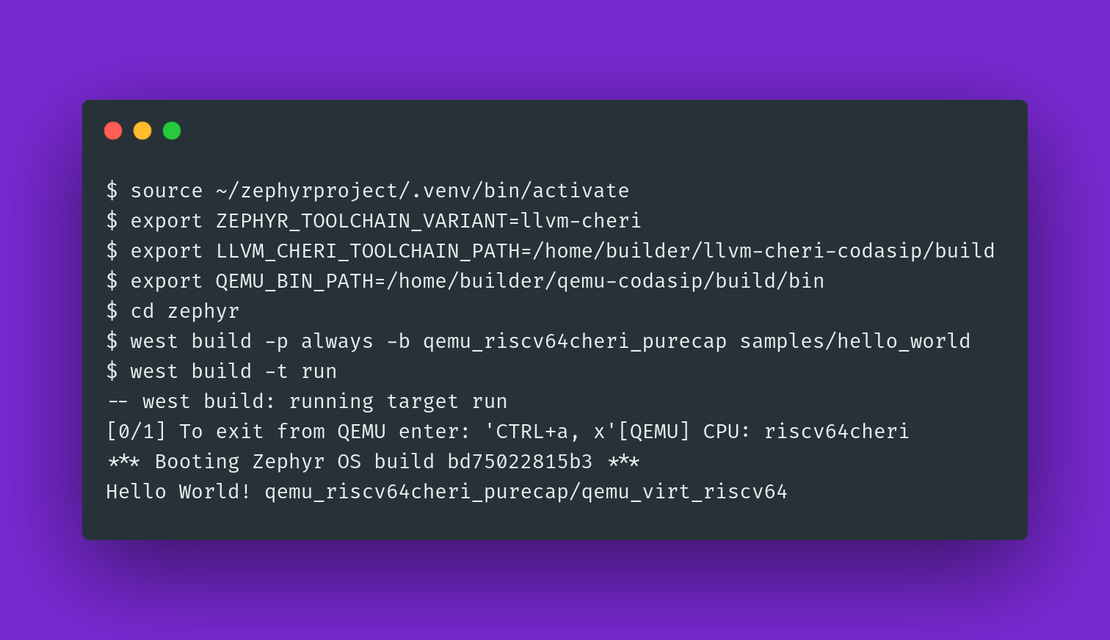
Once inside the container, you need to load the correct Python virtual environment and set environment variables to point the Zephyr build system to the appropriate CHERI toolchain and QEMU paths.
For CHERI-RISCV64 ZCHERIPURECAP v0.9.5:
source ~/zephyrproject/.venv/bin/activate
export ZEPHYR_TOOLCHAIN_VARIANT=llvm-cheri
export LLVM_CHERI_TOOLCHAIN_PATH=/home/builder/llvm-cheri-codasip/build
export QEMU_BIN_PATH=/home/builder/qemu-codasip/build/bin
For CHERI-RISCV64 ISAv9:
source ~/zephyrproject/.venv/bin/activate
export ZEPHYR_TOOLCHAIN_VARIANT=llvm-cheri
export LLVM_CHERI_TOOLCHAIN_PATH=/home/builder/cheri/output/sdk
export QEMU_BIN_PATH=/home/builder/cheri/output/sdk/bin
With the environment configured, you can now use the west tool to build and run an example application, such as hello_world.
Note: You will need to replace qemu_riscv64cheri_purecap depending on the tools present in your container (see options in the table above).
# Navigate to the zephyr source directory
cd zephyr
# Build the application for the CHERI RISC-V QEMU target
west build -p always -b qemu_riscv64cheri_purecap samples/hello_world
# Run the built application in QEMU
west build -t run
If the build and run commands are successful, the QEMU emulator will launch and display the following output:
*** Booting Zephyr OS build 4.1.99 ***
Hello World! qemu_riscv64cheri_purecap/qemu_virt_riscv64
Seeing it in action: Crash Demo
It’s most useful to see the value of CHERI instructions by looking at a real example.
A Buffer Overflow attack is a prevalent security vulnerability that capitalises on deliberately writing data beyond its intended bounds. This is the foundation of attacks like Return-Oriented Programming (ROP), which leads to arbitrary code execution and system compromise. In less controlled attacks, the overflow silently corrupts other variables or control data, leading to hard-to-debug system instability.
On a CHERI-enabled architecture, every pointer is a capability that enforces the base and length at a hardware-level. This means when a program attempts to write beyond the data’s bounds, a hardware exception is raised.
In this demo, we will create a simple C application that attempts to write 32 bytes into a 16 byte buffer on the stack. We will run this in a non-CHERI and CHERI QEMU system, and compare how it behaves.
Start by setting up your container environment, for brevity we will focus on the CHERI-RISCV64 ISAv9 tooling:
# Setup to use the CHERI-RISCV64 ISAv9 tools
source ~/zephyrproject/.venv/bin/activate
export ZEPHYR_TOOLCHAIN_VARIANT=llvm-cheri
export LLVM_CHERI_TOOLCHAIN_PATH=/home/builder/cheri/output/sdk
export QEMU_BIN_PATH=/home/builder/cheri/output/sdk/bin

# Move into the zephyr directory
cd zephyr
Create a directory structure for our cheri_crash project
mkdir -p samples/cheri_crash/src
Create samples/cheri_crash/src/main.c and populate it with the following code.
Note: The builder user within the container is a member of the sudo group.
New text editors can be installed with sudo apt install nano for example.
#include <zephyr/kernel.h>
#include <string.h>
#include <stdio.h>

void trigger_overflow(void)
{
	char buffer[16];

	printk("buffer address: %p\n", buffer);
	printk("buffer size: %zu\n", sizeof(buffer));

	printk("Attempting to overflow buffer...\n");

	/* This loop will trigger a hardware exception at index 16 */
	for (int i = 0; i < 32; i++) {
		buffer[i] = 0xAA;
	}

	printk("If you see this, the overflow went undetected!\n");
}

int main(void)
{
	printk("Starting CHERI Crash Demo\n");
	trigger_overflow();
	return 0;
}
Create a samples/cheri_crash/CMakeLists.txt file to define the build sources:
cmake_minimum_required(VERSION 3.20.0)
find_package(Zephyr REQUIRED HINTS $ENV{ZEPHYR_BASE})
project(cheri_crash)

target_sources(app PRIVATE src/main.c)
Create a samples/cheri_crash/prj.conf file.
We need to enable Minimal Logging mode; otherwise, the large CHERI crash dump will exceed the default logging buffer size and be dropped.
CONFIG_PRINTK=y
CONFIG_LOG=y
CONFIG_LOG_MODE_MINIMAL=y
If we now try to build and run cheri_crash without CHERI capabilities enabled, we can compare how it is handled when they are.
The qemu_riscv64cheri configuration targets standard RISC-V behaviour, meaning memory protections are not enforced.
west build -p always -b qemu_riscv64cheri samples/cheri_crash
west build -t run
In the log you can see the negative effects of this error.
The line “If you see this, the overflow went undetected!” is present, and the Return Address register (ra) has been overridden by the loop writing “0xAA” beyond the array’s bounds.
*** Booting Zephyr OS build 4.1.99 ***
Starting CHERI Crash Demo
buffer address: 0x80009b40
buffer size: 16
Attempting to overflow buffer...
If you see this, the overflow went undetected!
E:
E:  mcause: 1, Instruction Access fault
E:   mtval: aaaaaaaaaaaaaaaa
E:      a0: 000000000000002f    t0: 00000000800074da
E:      a1: 000000000000000a    t1: 0000000000000000
E:      a2: 0000000000000008    t2: 0000000000000068
E:      a3: 0000000010000005    t3: 0000000000000000
E:      a4: 0000000000000020    t4: 0000000000000000
E:      a5: 00000000800014f2    t5: 0000000000000000
E:      a6: 000000000000000a    t6: 0000000000000000
E:      a7: 0000000000000057
E:      sp: 0000000080009b60
E:      ra: aaaaaaaaaaaaaaaa
E:    mepc: aaaaaaaaaaaaaaaa
E: mstatus: 0000000a00001880
E:
E: >>> ZEPHYR FATAL ERROR 0: CPU exception on CPU 0
E: Current thread: 0x80008188 (unknown)
E: Halting system
Now rebuild using the qemu_riscv64cheri_purecap configuration instead (use qemu_riscv64cheri_zcheripurecap for CHERI-RISCV64 ZCHERIPURECAP v0.9.5).
west build -p always -b qemu_riscv64cheri_purecap samples/cheri_crash
west build -t run
The output has now changed.
The key lines here are mcause: 28, CHERI exception and mtval: 417, CHERI length violation.
Even though the pointer looked like a standard address (0x8001ae40), the hardware was tracking its size (16 bytes) in the background. The moment the code attempted to write to the 17th byte, the hardware triggered an exception and halted the system, preventing the corruption of the other registers.
*** Booting Zephyr OS build 4.1.99 ***
Starting CHERI Crash Demo
buffer address: 0x8001ae40
buffer size: 16
Attempting to overflow buffer...
E:
E:  mcause: 28, CHERI exception
E:  mtval: 417, CHERI length violation
E:      ca0: 0000000000000011    ct0: 000000000000000a
E:      ca1: 00000000000000aa    ct1: 000000000000000a
E:      ca2: 0000000000000020    ct2: fffffffffffffff5
E:      ca3: 000000008001ae50    ct3: 0000000000000000
E:      ca4: 0000000000000000    ct4: 0000000000000000
E:      ca5: 0000000080001928    ct5: 0000000000000000
E:      ca6: 000000000000000a    ct6: 0000000000000000
E:      ca7: 0000000000000057
E:      csp: 000000008001ae30
E:      cra: 000000008000050e
E:    mepcc: 000000008000051e
E: mstatus: 0000000a00001880
E:
E: >>> ZEPHYR FATAL ERROR 0: CPU exception on CPU 0
E: Current thread: 0x800192c0 (unknown)
E: Halting system
Improving the Status quo
We’ve written this blog post as a learning exercise to help us understand the current state of the CHERI Zephyr project, and to allow us to determine where The Capable Hub can add value.
Here, you can start to see some of the common issues prevalent across the CHERI ecosystem.
- Multiple forks of common tools (QEMU, LLVM, GDB) that are for different targets/specifications
- The forks of common tools lag behind the upstream versions
- The projects that use these tools (e.g. Zephyr) also lag behind upstream (Zephyr 4.3 is the current release, 4.1 went out of support November 2025)
Consequently, every project tends to use a unique development container. This overcomes issues in building with the correct dependencies and makes it easier to test when physical hardware is limited. Whilst this approach simplifies onboarding for new Zephyr developers, it obfuscates it’s dependencies.
At The Capable Hub, our mission is to collaborate with the ecosystem to improve the availability, quality and upstream alignment of open-source CHERI software.